How Opssy collects consent for SMS verification codes
Opssy is crew operations software for aviation professionals. Opssy is a product of Findence LLC.
This page does not collect anything. Consent to receive text messages is given only inside the Opssy mobile app, on the account-creation screen. This page describes that screen and shows screenshots of it.
In short
- To create an Opssy account, a person confirms their email address and their mobile phone number, each with a one-time code.
- A verified phone number is required, but SMS is optional. The person chooses how to receive the phone code: by text message or by an automated voice call. Neither choice is preselected.
- Text messages are sent only to a person who chooses Text me a code and ticks a separate SMS consent checkbox. The checkbox is unchecked by default and is never ticked for the person.
- A person who does not want text messages chooses Call me with a code and can still create an account. Choosing a call does not enroll anyone in SMS.
- Opssy sends only one-time account verification codes that the person requests. Opssy never sends marketing messages, and never switches between text and call on its own.
The account-creation screen, step by step
1. Account details
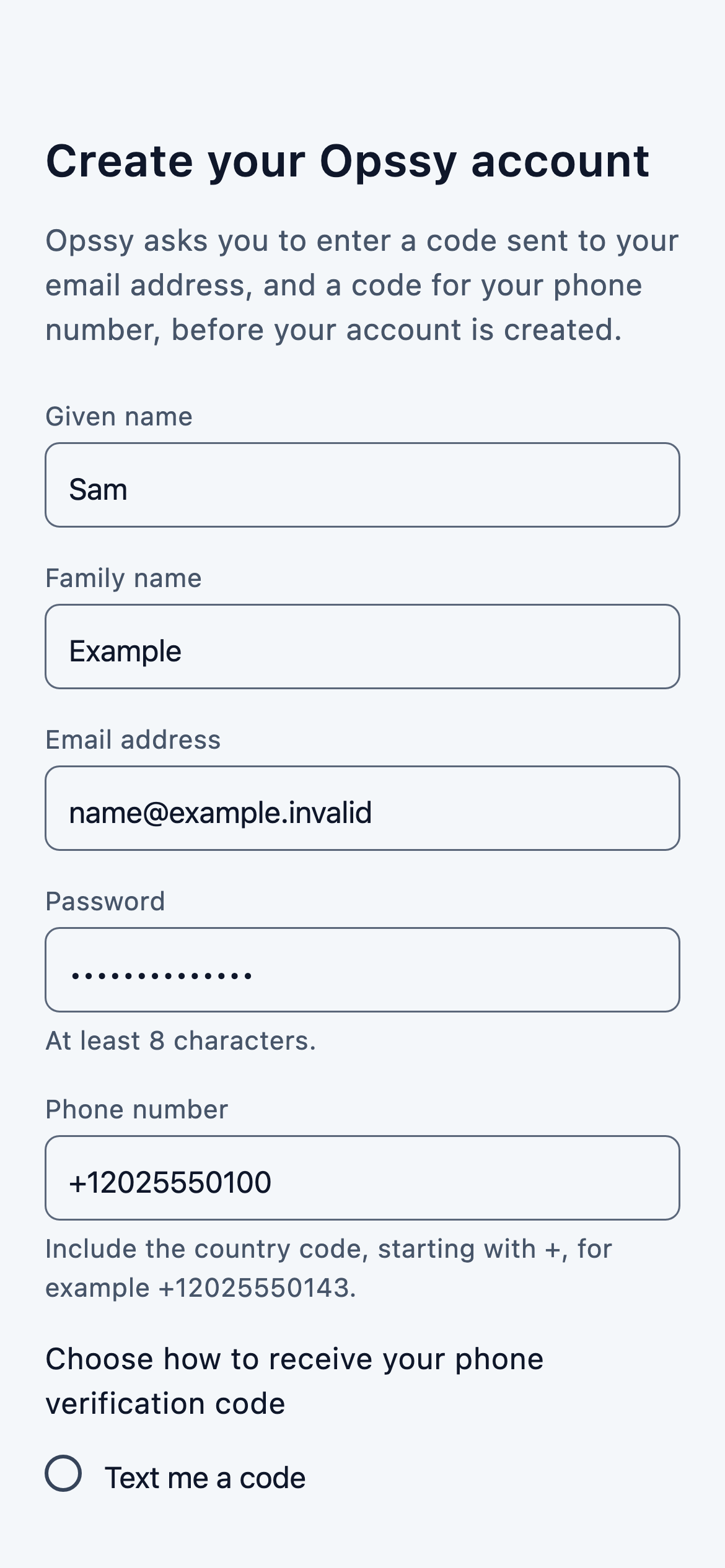
On Create your Opssy account, the person enters their given name, family name, email address, a password and their phone number.
2. Choosing how to receive the phone code
Directly after the phone number field, the app asks:
Choose how to receive your phone verification code
The two options are Text me a code and Call me with a code. Neither is selected when the screen opens. If the person continues without choosing, the app shows: “Choose how to receive your phone verification code.”
3. Text me a code: the SMS consent checkbox
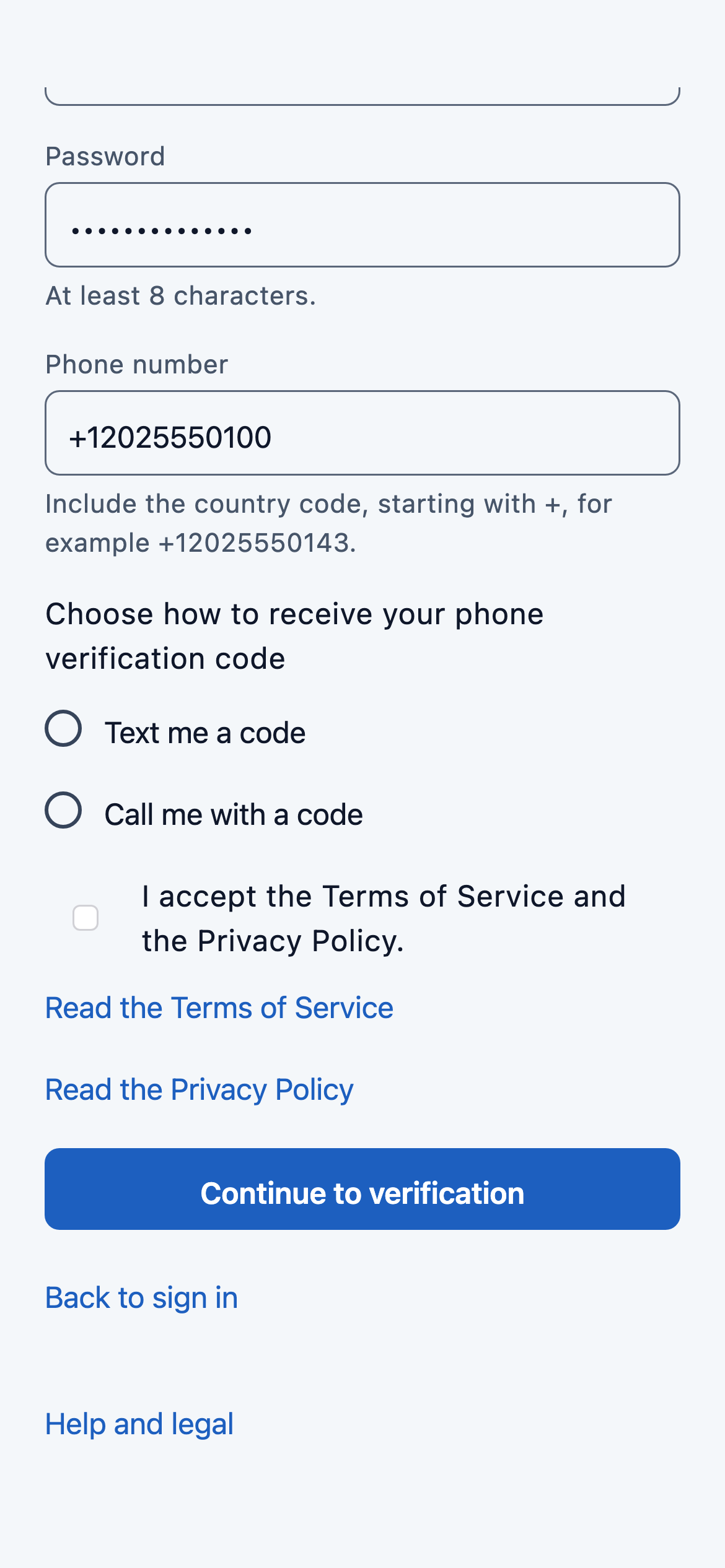
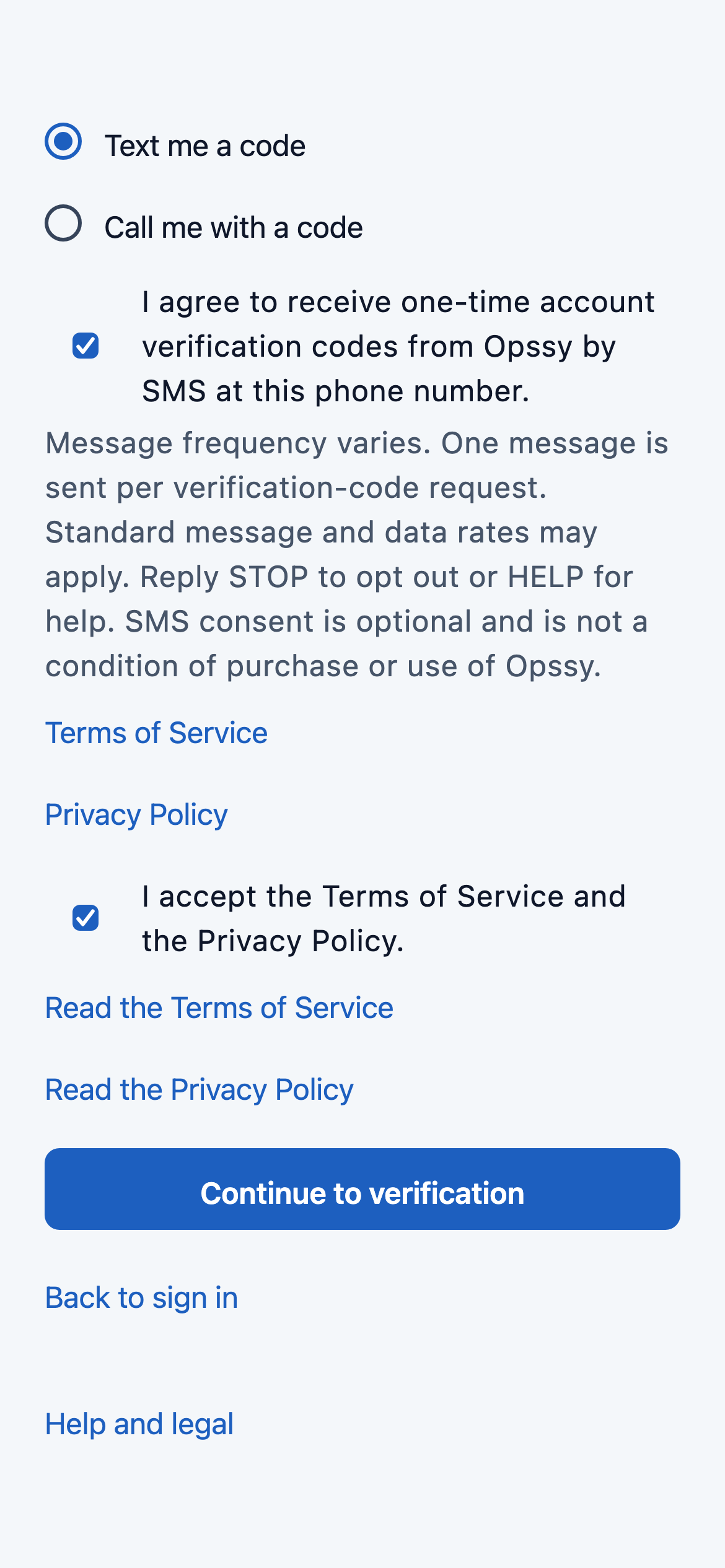
When the person chooses Text me a code, a separate checkbox appears. It is unchecked, and only the person’s own tap checks it. Its label reads exactly:
I agree to receive one-time account verification codes from Opssy by SMS at this phone number.
Next to the checkbox, the app shows this disclosure, exactly:
Message frequency varies. One message is sent per verification-code request. Standard message and data rates may apply. Reply STOP to opt out or HELP for help. SMS consent is optional and is not a condition of purchase or use of Opssy.
Two separate links, Terms of Service and Privacy Policy, sit beside the disclosure and open the same documents published at Opssy Terms of Service and Opssy Privacy Policy.
If the person chooses a text message but leaves the checkbox unchecked, no message is sent and the app explains: “To receive the code by text message, agree to receive SMS verification codes, or choose a call instead.”
4. Call me with a code: the voice alternative
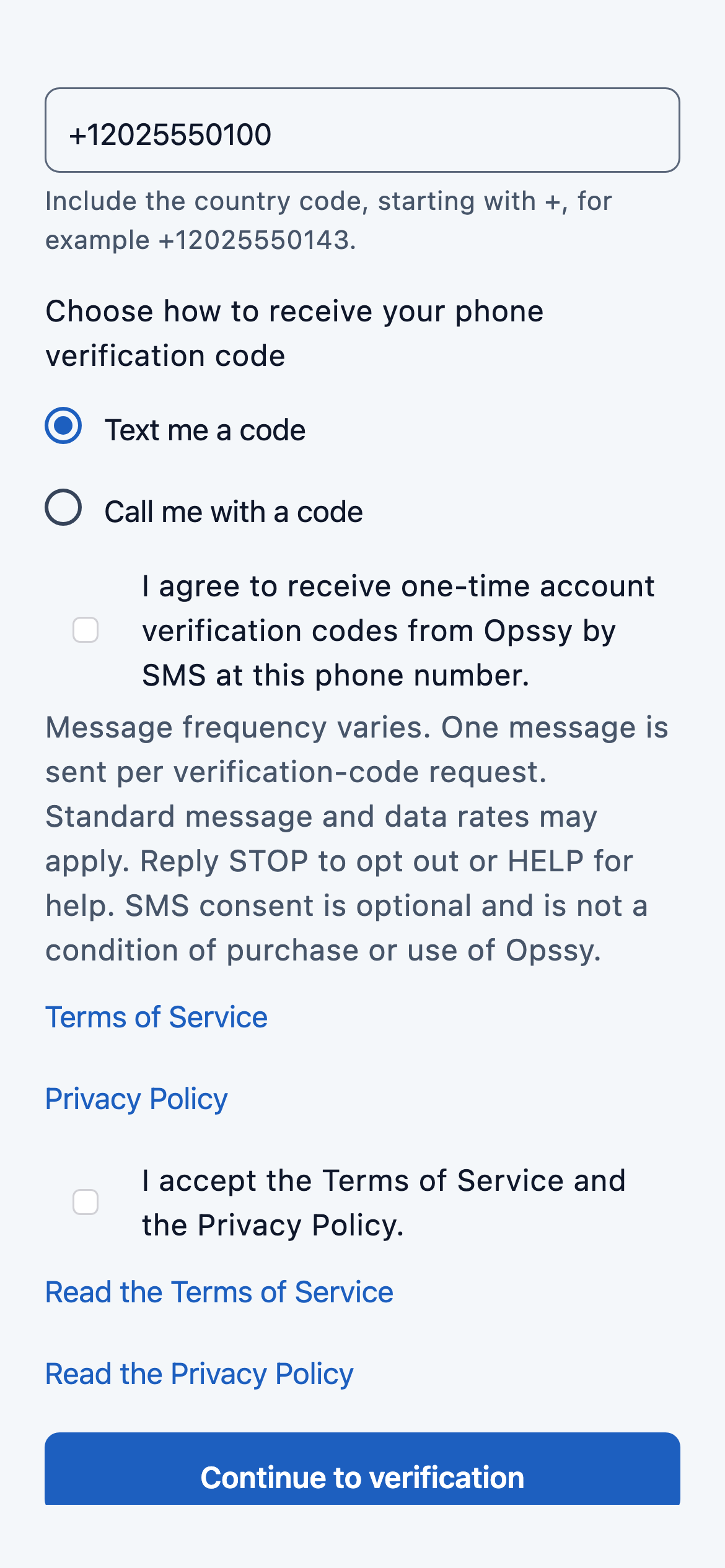
When the person chooses Call me with a code, no SMS checkbox is shown, and the app shows this disclosure, exactly:
By continuing, you request one automated call from Opssy at this phone number containing a one-time verification code. Your carrier’s call charges may apply. This does not enroll you in SMS.
5. Accepting the Terms and continuing
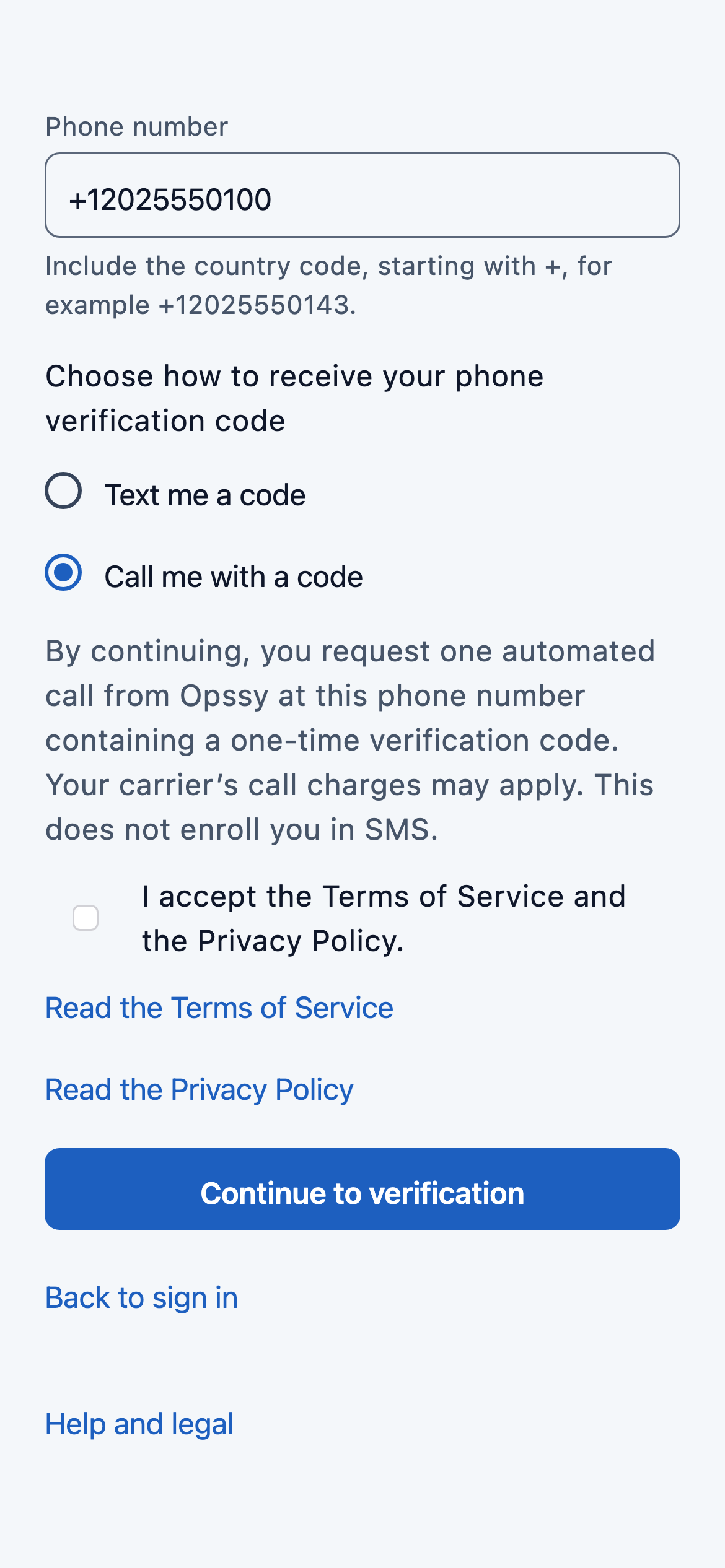
Separately from the SMS consent, the person accepts the Terms of Service and the Privacy Policy with their own unchecked checkbox, “I accept the Terms of Service and the Privacy Policy.”, and then taps Continue to verification.
6. After continuing
Opssy first sends a code to the email address. After that code is confirmed, Opssy sends one phone code by the method the person chose: one text message, or one automated call. Every further code is sent only when the person asks for it, by the same method. The person can go back and choose a different method; choosing text again shows the SMS consent checkbox unchecked again.
SMS terms
- Sender: Opssy, a product of Findence LLC.
- Purpose: one-time account verification codes that the person requests while creating an Opssy account. No marketing.
- Message frequency: message frequency varies. One message is sent per verification-code request.
- Cost: standard message and data rates may apply.
- Help: reply HELP for help, or email support@findence.com.
- Opt out: reply STOP to opt out.
- Optional: SMS consent is optional and is not a condition of purchase or use of Opssy. An automated voice call is always available instead.
- Carriers are not liable for delayed or undelivered messages.
A verification text message reads like this, with the person’s own code:
Opssy: Your verification code is 123456. It expires in 10 minutes. Reply STOP to opt out or HELP for help.
Mobile information and text-messaging consent are not sold, rented or shared for marketing or promotional purposes. The full terms are in the Opssy Terms of Service, and how mobile information is handled is in the Opssy Privacy Policy.
About the screenshots
The screenshots are taken from the Opssy app’s account-creation screen. They show fictional example details, not a real person’s information.